
What the Krira TV original domain question really means
People usually search for the original domain after seeing more than one Krira TV URL, a renamed APK page or an app listing with the same title. The useful question is not which address looks most polished. It is whether the address leads to a consistent source record that explains the app, the release file and the update path.
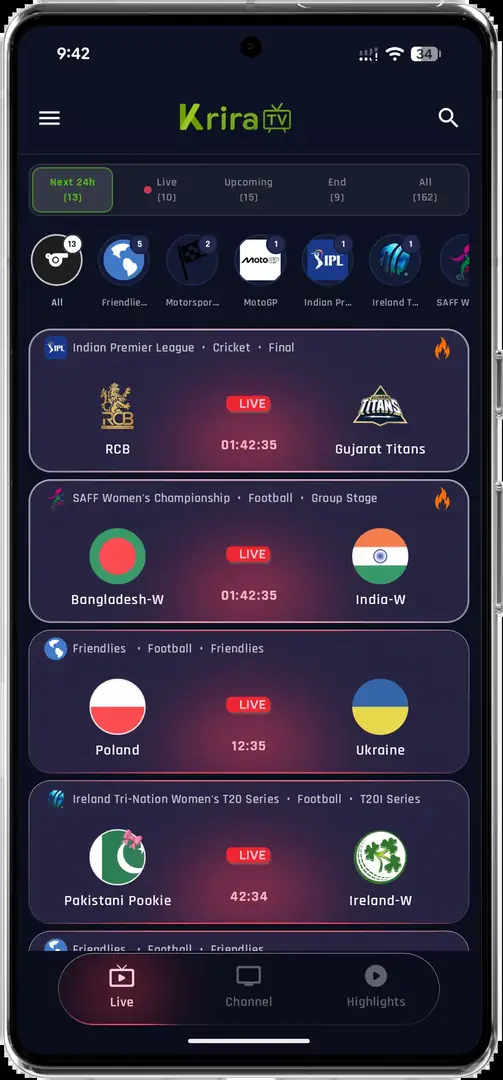
The Krira TV Wiki is an independent guide, not the app publisher. The interface screenshot above is included for recognition only. An image, logo or copied paragraph can be reused by an unrelated site, so treat visual similarity as one clue and keep the file evidence separate.
- A domain name is an identity clue, not a safety verdict.
- A store title is not enough to merge two applications.
- A download page should expose a source, version, size and check date.
- An APK that asks for unexplained companion apps or credentials deserves a stop-and-check response.
The domain helps you trace a source. The hash helps you compare bytes. Neither one alone proves who signed the APK or whether its remote streams are lawful and available.
Check the domain and the release source chain
Start with the publisher-associated pages at kriratv.com/official/ and kriratv.com/download/. Follow the stated download path and record every host involved. A redirect to an external file host is not automatically a problem, but the final host, file name and release details should be visible instead of hidden behind a sequence of unrelated buttons.
The events screen below shows why interface recognition is useful but limited. Seeing a familiar event list does not prove that the page that supplied an APK is the publisher. Compare the domain, the source page, the final file host and the update instructions as one chain. If one link changes without explanation, return to the source page rather than guessing.
- Open the stated source pageUse the first-party page as the starting point and note its check date, contact details and download instructions.
- Record the final hostCheck where the file actually comes from after redirects; do not call a mirror official just because a search result linked to it.
- Compare the release recordThe version, file name, byte size and checksum should describe the same file that you are about to open.
Match package identity, version, file size and SHA-256
The source-linked record checked for this site listed Krira TV v6.2.6, Android 6.0 or later, and a file of 11,652,593 bytes, about 11.11 MiB. The record also contains a SHA-256 value. These are time-stamped facts about a checked file, not a promise that every page using the Krira TV name has the same release.
The direct APK record does not give you permission to borrow a package name from a different store listing. The Google Play result identified as REGULEX LTD uses package com.kriratv.livesport; it must be treated as a separate record until a publisher connection is documented. On Android, compare the installed app’s package name, version and signing behavior instead of assuming that a shared title means shared ownership.
- Read the Android app detailsAfter installation, open the system app details and note the package name and version shown by Android.
- Compare the source recordCheck the package, version, minimum Android requirement and file size against the source information; an unexplained mismatch is a stop sign.
- Hash the exact fileCalculate SHA-256 on the downloaded bytes, not on a renamed copy or a screenshot of a checksum.
- The current site record is v6.2.6, 11,652,593 bytes, Android 6.0+, as checked on July 30, 2026.
- The recorded SHA-256 is 05CE77D1179977E12C993732D41BAB3E271D0D733065C35FFA56F30B7EC95F45.
- A package mismatch, signature conflict or unexpected size change should be investigated before updating an installed app.
- A hash match proves byte-level equality only; it is not a malware scan or publisher certificate.
| Field | What to compare | What it does not prove |
|---|---|---|
| Domain/source | First-party page, release path and final host | That every file on the host is genuine |
| Package name | Android package shown by the installed APK | That the publisher or code is safe |
| Version and size | Release label and exact byte count | That a newer file is trustworthy |
| SHA-256 | Hash of the exact downloaded file | Publisher identity, legality or stream uptime |
The Google Play listing and the source-linked direct APK are separate records in this guide. Compare publisher, package, version and update path before treating them as one application.
Handle similar domains and old search results carefully
Search results can surface `krira tv.com`, `krira tvapp.com` or other close spellings. Those strings are useful variants to investigate, not reasons to publish a separate download page for every domain. A look-alike page may copy the app name, use an old version number or send the visitor through an unrelated installer.
If a page cannot explain its source relationship, release date, package identity and file checksum, leave it out of the trusted chain. The existing official-app comparison and version evidence guide contain the broader publisher and release context.
- Check spelling, HTTPS, redirect destination and the page’s stated publisher relationship.
- Treat a domain that promises a different EXE, IPA or ‘TV converter’ as a different product until proven otherwise.
- Do not use Reddit, a copied video description or a search snippet as the only proof of an official domain.
- Keep the old-version claim on the version page instead of creating a thin page around a stale filename.
Stop when the download record does not line up
A careful check is allowed to end with ‘not verified’. That is better than forcing an installation through an unknown mirror. Stop if the download button changes host several times, if the file size does not match the record, if the hash fails, or if the page asks for a password, activation code, disabled security setting or unexplained companion player.
For update problems, keep the existing installation until package identity and signing behavior are clear. Use the update guide for signature conflicts and the download policy for source and link-removal standards. Installing an APK also does not grant subscription, copyright or geographic access rights to a stream.
- PauseDo not uninstall the known app or accept a security bypass while the record is inconsistent.
- RecheckReturn to the source page and compare the current release, host, size and checksum again.
- Choose a bounded answerIf the facts still disagree, record the uncertainty and use a verified platform path or official store page instead.
This guide does not certify APKs. It gives you a repeatable comparison process and keeps unknown publisher, package and safety claims visible.
What this verification page can and cannot answer
This page can help you trace a domain to a stated release record, compare an exact file with a published checksum and avoid confusing a same-name store listing with a direct APK. It cannot independently certify the publisher, inspect every line of code, guarantee that a remote stream is available or decide the copyright rules for content in your location.
Use the Android APK guide for the current site-linked file record, troubleshooting for device errors, and the Google Play record only as a separate listing to compare. Recheck the source and date whenever you download a new file.
- Verified: the fields that appear in the checked source record.
- Comparable: domain path, package name, version, byte size and SHA-256.
- Not established by this page: publisher identity, malware-free status, legality or future availability.
- Time-sensitive: release pages, mirrors, store records and file contents can change.
Krira TV original domain FAQ
What is the Krira TV original domain?
The phrase is a request to identify the source behind a Krira TV download, but a domain name alone is not proof of ownership or safety. Start with the publisher-associated source page, follow the release path and compare the file record before installing.
Is krira tv.com automatically the official Krira TV APK source?
A familiar spelling should be checked against the stated source page, final file host, release details and update instructions. Do not call a mirror or a similar domain official without evidence of that relationship.
Is the Google Play package com.kriratv.livesport the same as the direct APK?
Not automatically. The Play listing identifies REGULEX LTD and package com.kriratv.livesport. This guide keeps it as a separate record until a documented publisher connection, package match and update path are available.
What does the Krira TV APK SHA-256 hash prove?
It proves that the bytes you hashed match the reference bytes that produced the recorded value. It does not prove publisher identity, safe code, legal access or future stream availability.
What should I do if the APK version or package name is different?
Pause before updating or uninstalling. Return to the source page, compare the release record and inspect the Android app details. A mismatch or signature conflict should not be bypassed with an unknown companion installer.
Does this page certify that a Krira TV APK is safe?
No. It documents a source-and-file comparison method. It does not provide a malware certification, publisher endorsement, copyright clearance or guarantee that a stream will work in every country.